 SessionTap
Frequency and duration data for RBTs, on your phone
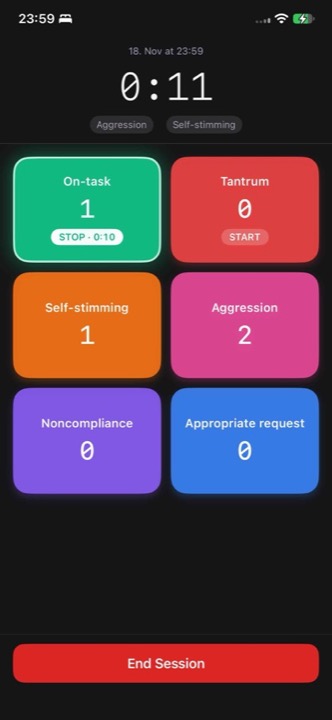
In a session your hands and eyes are busy. SessionTap puts each target behavior on a big colored button: tap once for each occurrence, or tap to start and stop timing. When the session ends, the counts, rates and durations are already worked out.
What it handles for you
- Rate per minute for every frequency target, from the exact session length.
- Duration as the number of episodes, total time and percent of session. Two durations can run at the same time while you keep counting other targets.
- Timestamps on every tap, listed in order after the session, so you can tell your BCBA when in the session things happened.
- Notes for the session, and a CSV export you can email or share with your supervisor.
- No login. Open it and start; it works offline and keeps timing if the phone locks.
What it does not do
SessionTap records frequency and duration. It does not do ABC data, partial or whole interval recording, momentary time sampling, trial-by-trial or task analysis data, and it is not a practice management system: no scheduling, billing or client records. If your clinic requires a specific system for official session data, follow that. SessionTap can still help with practice, with extra targets your BCBA asks you to count, or where the clinic system isn't available.
For the methods it doesn't cover there are free paper sheets: ABC and interval recording.
Studying measurement for the RBT exam
Measurement is a section of the RBT exam. The guides on this site cover the methods you'll be asked about, with worked examples:
- Frequency recording and rate
- Duration and latency
- Partial interval, whole interval and momentary time sampling
- ABC data
Privacy
Session data stays on the phone. There is no account and nothing is uploaded, so client data doesn't sit on our servers. Avoid putting client names in board or session names if your clinic's policy asks you to; use initials or codes. The app sends usage analytics tied to a random identifier (session length, number of events, which screens you use). Since version 1.0.4 it never sends the names you type or your notes (privacy policy).