 SessionTap
Behavior data collection on your iPhone
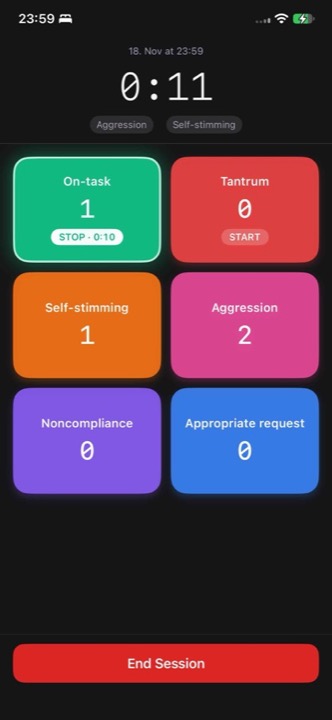
SessionTap is a board of colored buttons for live observation. Tap a button each time a behavior happens, or tap once to start timing it and again to stop. The app keeps the timestamps, works out rates and percentages when the session ends, and exports a CSV you can graph or hand to a supervisor.
What it records
SessionTap records the two basic continuous measures:
- Frequency. Each tap adds one occurrence with its timestamp. At the end you see the count and the rate per minute.
- Duration. One tap starts timing, the next stops it. While it runs, the button shows how long it has been going. At the end you see how many episodes there were, their total time and what percentage of the session they took up. Several durations can run at once, so "on-task" can keep timing while you count other behaviors.
A board can mix both kinds. You can start from a template (ABA basics, classroom assessment, simple counter and others), duplicate it and rename the buttons, or build your own.
It does not record ABC data, interval recording or momentary time sampling yet. For those, the free printable sheets work on paper.
After the session
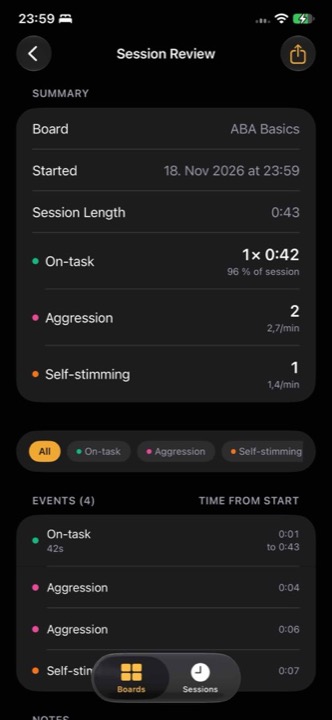
- A summary of each behavior: count and rate per minute, or number of episodes, total time and percent of session.
- Every event in order, with its time from the start of the session, filterable by behavior.
- A notes field for the session.
- Export CSV gives one row per event with its timestamp, end time, behavior, mode and duration in seconds. It opens in Excel, Google Sheets and Numbers.
Compared with a clicker or paper
- No account and no cloud. Sessions are stored on the phone and only leave it if you export a CSV and share it yourself. The app sends usage analytics such as session length and number of events, never names you type or notes. (Privacy policy)
- Works offline, in a clinic, a home or a classroom with bad Wi-Fi.
- Keeps going if the phone locks or you switch apps. Timing runs from the clock, not from the screen being open.
- One payment. Three full sessions are free so you can try it on a real observation. After that, $14.99 once unlocks unlimited sessions. No subscription.
It runs on iPhone and iPad with iOS 17 or later.
Free data sheets and guides
- Frequency data sheet
Count and rate per minute, 18 observations per page.
- Duration data sheet
Start and stop times, total and percent of observation.
- ABC data sheet
Narrative and checklist versions.
- Weekly behavior tracking sheet
Three behaviors, five days, with a graph.
- Interval recording sheet
Partial, whole interval or momentary time sampling.
- Recording method guides
Which method to use and how to take the data.
Who it is for
- RBTs taking frequency and duration data in sessions
- BCBAs who want staff to take timestamped data without another login
- Special education teachers and paras tracking IEP behavior goals in the classroom
- Schools and districts that need to know where the data goes
People also use it for sports scouting, UX research and anything else that needs counting and timing.